# ComfyUI-UniverSR
**Audio super-resolution for ComfyUI** — upscale low-bandwidth audio to a full **48 kHz** with
[UniverSR](https://github.com/woongzip1/UniverSR), *Unified and Versatile Audio Super-Resolution via
Vocoder-Free Flow Matching* (ICASSP 2026).
[](https://arxiv.org/abs/2510.00771)
[](https://arxiv.org/abs/2510.00771)
[](https://woongzip1.github.io/universr-demo/)
[](LICENSE)
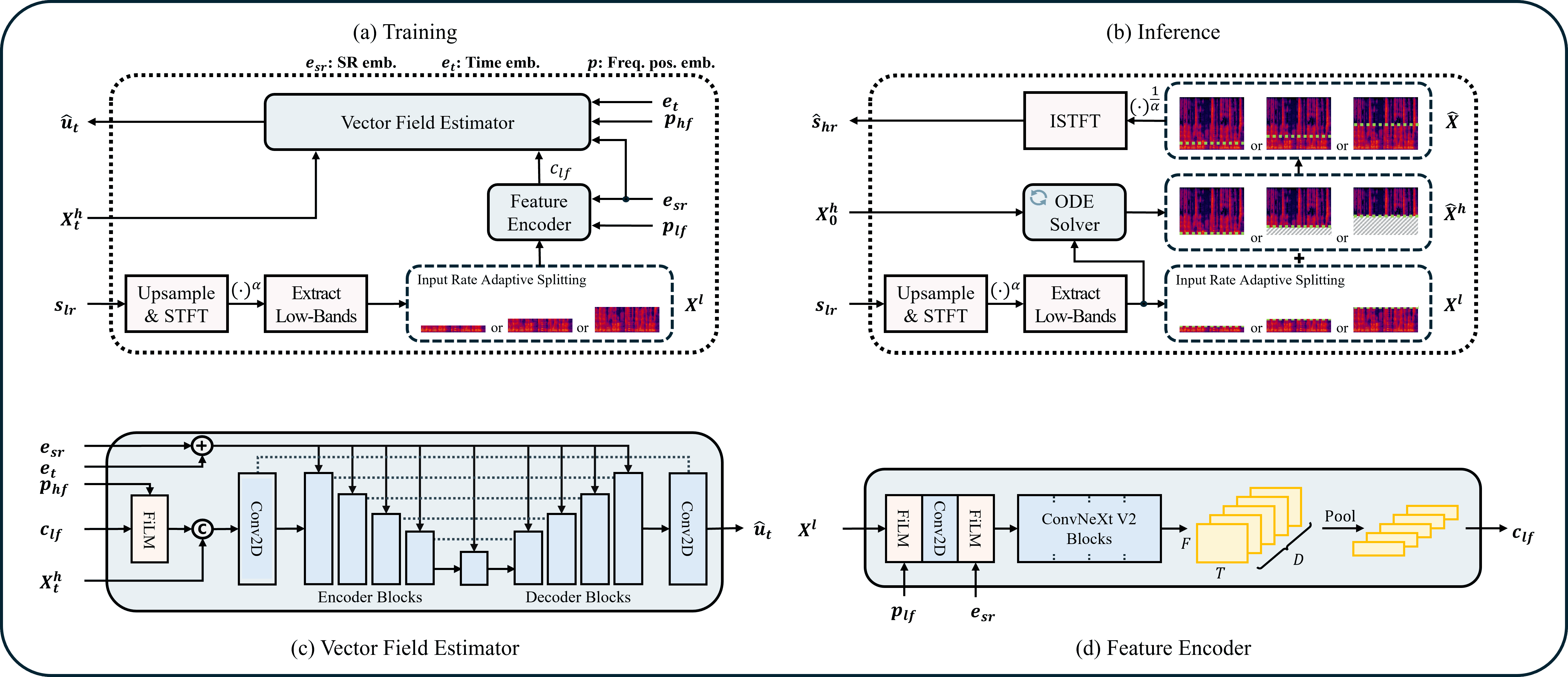
One model upscales **8 / 12 / 16 / 24 kHz** effective bandwidth → **48 kHz** for **speech, music and
sound effects**. It works directly in the complex‑STFT domain with flow matching — **no neural
vocoder** — and *regenerates* the missing high‑frequency band instead of merely interpolating, so
muffled or band‑limited audio gets believable "air" and detail back.
---
## Table of contents
- [Features](#features)
- [Installation](#installation)
- [Models](#models)
- [Nodes](#nodes)
- [UniverSR Model Loader](#universr-model-loader)
- [UniverSR Super-Resolution](#universr-super-resolution)
- [Choosing `input_sr`](#choosing-input_sr-the-one-setting-that-matters-most)
- [Recommended settings](#recommended-settings)
- [Long audio & chunking](#long-audio--chunking)
- [Example workflow](#example-workflow)
- [How it works](#how-it-works)
- [Troubleshooting](#troubleshooting)
- [Credits & license](#credits--license)
---
## Features
- 🎚️ **8 / 12 / 16 / 24 kHz → 48 kHz** with a single model — speech, music, SFX.
- 🧩 **Two-node design** — a cached **Model Loader** + a **Super-Resolution** sampler.
- ⬇️ **Auto-download** of the official checkpoints into `models/universr/` on first use.
- 🔗 **Long-audio chunking** with click-free overlap-add (handles clips of any length).
- 🎧 **Stereo-aware** — each channel is processed independently and preserved.
- 🎛️ **Wet/dry blend** — full SR, or dial it back to gently brighten already-48 kHz audio (BWE).
- 🎲 **Seed control** with **global-RNG isolation** (won't perturb other nodes' randomness).
- 📊 Optional **before/after spectrogram** image output.
- 📦 **Self-contained** — the UniverSR inference code is vendored; the only extra dependency beyond
ComfyUI's stack is `torchdiffeq`.
---
## Installation
```bash
cd ComfyUI/custom_nodes
git clone https://github.com/ethanfel/ComfyUI-UniverSR.git
pip install -r ComfyUI-UniverSR/requirements.txt
```
Then restart ComfyUI. The nodes appear under the **`audio/UniverSR`** category.
**Dependencies.** `torch`, `torchaudio`, `numpy` and `matplotlib` already ship with ComfyUI. This node
only adds:
```
torchdiffeq einops timm huggingface_hub pyyaml
```
(`einops`/`timm`/`huggingface_hub`/`pyyaml` are usually already present; `torchdiffeq` is the one
that typically needs installing.) The `universr` package itself is **vendored** under `vendor/` — if a
`pip`-installed copy is found it is preferred, otherwise the bundled one is used, so no `git+` install
is required.
> **GPU recommended.** Inference runs on CUDA if available and falls back to CPU (much slower).
---
## Models
| Preset | Domain | Hugging Face | Notes |
|---|---|---|---|
| `universr-audio` | General (music / SFX / mixed) | [`woongzip1/universr-audio`](https://huggingface.co/woongzip1/universr-audio) | **Recommended default.** |
| `universr-speech` | Speech / voice | [`woongzip1/universr-speech`](https://huggingface.co/woongzip1/universr-speech) | Tuned for voice recordings. |
Each preset is ~230 MB and **downloads automatically** to `ComfyUI/models/universr//` the
first time you load it (it lands as `config.yaml` + `pytorch_model.bin`).
**Manual / offline install** — drop the two files into `ComfyUI/models/universr//` yourself:
```bash
huggingface-cli download woongzip1/universr-audio \
--local-dir ComfyUI/models/universr/universr-audio
```
Any folder you place under `models/universr/` that contains `config.yaml` + `pytorch_model.bin` will
also show up in the loader's **model** dropdown.
---
## Nodes
```
LoadAudio ─────────────┐
▼
UniverSR Model Loader ─► UniverSR Super-Resolution ─► SaveAudio / PreviewAudio
└─ spectrogram ─► PreviewImage
```
### UniverSR Model Loader
Loads (and caches) a checkpoint. Output: **`UNIVERSR_MODEL`**.
| Input | Type | Default | Description |
|---|---|---|---|
| `model` | choice | `universr-audio` | Preset to download, or a local checkpoint folder found under `models/universr/`. |
| `device` | `auto` / `cuda` / `cpu` | `auto` | Where to load the weights. `auto` picks CUDA when available. |
| `local_path` *(opt.)* | string | `""` | Override: a folder with `config.yaml` + `pytorch_model.bin`, **or** a raw training checkpoint (`.pth` / `.ckpt`). |
| `config_path` *(opt.)* | string | `""` | `config.yaml` to pair with a raw checkpoint. Empty → the bundled default config. |
The loaded model is cached by `(path, device)`, so re-running a graph or reusing the loader across
runs does **not** reload the weights.
### UniverSR Super-Resolution
Runs the super-resolution. Outputs: **`AUDIO`** (48 kHz) and **`IMAGE`** (spectrogram).
| Input | Type | Default | Range | Description |
|---|---|---|---|---|
| `audio` | AUDIO | — | — | Input audio (any sample rate / mono or stereo). |
| `model` | UNIVERSR_MODEL | — | — | From the Model Loader. |
| `input_sr` | choice | `8000` | 8000 / 12000 / 16000 / 24000 | **Effective input bandwidth (Hz).** Content is treated as valid up to `input_sr/2` and **regenerated above it**. See below. |
| `ode_method` | choice | `midpoint` | euler / midpoint / rk4 | ODE solver. `euler` fastest → `midpoint` balanced → `rk4` best. |
| `ode_steps` | int | `4` | 1–64 | Flow-matching integration steps. `4` is fast & validated; `4–10` is a good range. |
| `guidance_scale` | float | `1.5` | 0–6 | Classifier-free guidance. Higher = denser highs but less faithful. `0` disables CFG. |
| `seed` | int | `0` | — | Noise seed for the flow source. `0` = random each run. |
| `chunk_seconds` | float | `10.0` | 0–120 | Process long audio in chunks this long to bound VRAM. `0` = whole clip at once. |
| `overlap_seconds` | float | `0.5` | 0–5 | Crossfade overlap between chunks (prevents seam clicks). |
| `blend` | float | `1.0` | 0–1 | Wet/dry mix. `1.0` = full SR; lower keeps more of the original. |
| `unload_model` | bool | `false` | — | Free the model from VRAM after this run. |
| `show_spectrogram` | bool | `true` | — | Also output a before/after spectrogram comparison image. |
---
## Choosing `input_sr` (the one setting that matters most)
`input_sr` tells the model the **effective bandwidth** of your content. Everything **above
`input_sr / 2`** is treated as missing and regenerated:
| `input_sr` | Treated as valid up to | The model regenerates |
|---|---|---|
| `8000` | 4 kHz | 4 – 24 kHz |
| `12000` | 6 kHz | 6 – 24 kHz |
| `16000` | 8 kHz | 8 – 24 kHz |
| `24000` | 12 kHz | 12 – 24 kHz |
Two ways to use it:
1. **Genuine low-rate audio (classic super-resolution).** You have an 8 kHz (or 16/24 kHz) recording
and want a full 48 kHz result → set `input_sr` to that rate. **8 kHz → 48 kHz is the strongest
case** (the model is trained 70 % on it).
2. **Brighten muffled but full-rate audio (bandwidth extension).** Your file is already 48 kHz but
sounds dull / rolled-off (e.g. generated audio, old MP3s). Pick the `input_sr` that matches where
real content ends and let the model rebuild above it — `16000` (rebuild only above 8 kHz) is the
most natural; `8000` is brighter and more aggressive. Combine with **`blend < 1.0`** to keep the
dry signal and add just a touch of high end.
> The node always reproduces the model's training degradation internally (band-limit → super-resolve),
> so you don't need to pre-process or resample your audio — just pick the bandwidth.
---
## Recommended settings
| Content | `input_sr` | `guidance_scale` | `ode_method` / `ode_steps` |
|---|---|---|---|
| Speech (8 kHz source) | 8000 | 1.0 – 1.5 | midpoint / 4 |
| Music (8 kHz source) | 8000 | 1.5 – 2.0 | midpoint / 4–8 |
| Sound effects | 8000 | ~1.5 | midpoint / 4 |
| Brighten dull 48 kHz audio | 16000 | 2.0 – 3.0 | midpoint / 4 (try `blend` 0.6–1.0) |
Notes:
- Higher `guidance_scale` (>3) produces denser highs but can add hiss/artifacts.
- Higher input rates (especially 24 kHz) reconstruct less high-frequency detail than 8 kHz, an upstream
model limitation — see the [UniverSR notes](https://github.com/woongzip1/UniverSR#-known-limitations--tips).
---
## Long audio & chunking
UniverSR runs the whole clip through a flow-matching ODE in one pass, which exhausts VRAM on long
files. This node splits the audio in the time domain and stitches the results with **overlap-add and a
linear crossfade** (weight-normalised), so seams are click-free.
- `chunk_seconds` — lower it if you hit out-of-memory errors; `0` processes the whole clip at once.
Values below ~0.68 s are raised to the model's internal minimum automatically.
- `overlap_seconds` — raise it slightly if you ever hear a seam between chunks.
- Stereo is processed per-channel; a ComfyUI progress bar tracks `batch × channels × chunks`.
---
## Example workflow
A ready-made graph is in [`example_workflows/universr_super_resolution.json`](example_workflows/universr_super_resolution.json)
— **drag it onto the ComfyUI canvas**. It wires `LoadAudio → UniverSR Model Loader → UniverSR
Super-Resolution → PreviewAudio` with the spectrogram going to a `PreviewImage`.
---
## How it works
ComfyUI audio arrives at an arbitrary real sample rate. UniverSR's *file* API relies on
`torchaudio.load` (whose torchcodec backend is fragile across environments), and its *tensor* API
assumes the tensor is already at `input_sr`. So this node does the band-limit itself, entirely with
pure-DSP resampling (no codec):
1. Resample the input to 48 kHz.
2. For each chunk, downsample to `input_sr` → hand UniverSR a *genuine* low-rate tensor.
3. UniverSR upsamples back to 48 kHz internally and regenerates the high band via flow matching.
4. Overlap-add the enhanced chunks; optionally blend with the dry signal.
This reproduces the exact training-time degradation (validated against the upstream pipeline). The
node also **snapshots and restores the global torch/CUDA RNG** around inference, so seeding here never
makes the rest of your ComfyUI graph deterministic.
---
## Troubleshooting
| Symptom | Fix |
|---|---|
| `Could not import the 'universr' package` | `pip install torchdiffeq` into your ComfyUI Python env. |
| CUDA out of memory | Lower `chunk_seconds` (e.g. 5–8), or set the loader `device` to `cpu`. |
| Output sounds harsh / hissy | Lower `guidance_scale`; for BWE, raise `input_sr` and/or lower `blend`. |
| Result barely brighter | This is normal for higher `input_sr`; use a lower `input_sr` or raise `guidance_scale`. |
| First run hangs for a while | It's downloading the ~230 MB checkpoint — watch the console. |
| Spectrogram is blank | `matplotlib` is missing/headless; audio output is unaffected. |
---
## Credits & license
UniverSR © Woongjib Choi, Sangmin Lee, Hyungseob Lim, Hong-Goo Kang — [DSPAI Lab, Yonsei
University](http://dsp.yonsei.ac.kr/) — released under the **MIT License** (see [`LICENSE`](LICENSE)).
This repository wraps UniverSR for ComfyUI and vendors its inference code **unmodified** under
`vendor/`. All credit for the model and method goes to the original authors.
```bibtex
@inproceedings{choi2026universr,
title = {{UniverSR}: Unified and Versatile Audio Super-Resolution via Vocoder-Free Flow Matching},
author = {Choi, Woongjib and Lee, Sangmin and Lim, Hyungseob and Kang, Hong-Goo},
booktitle = {IEEE International Conference on Acoustics, Speech, and Signal Processing (ICASSP)},
year = {2026}
}
```
**Links:** [paper](https://arxiv.org/abs/2510.00771) · [demo](https://woongzip1.github.io/universr-demo/) ·
[upstream repo](https://github.com/woongzip1/UniverSR)