 Ethanfel
e5110b88e1
Ethanfel
e5110b88e1
New "auto" option (now the default) on the Sampler's input_sr. detect_input_sr
finds the spectral cutoff cliff (steepest drop) and its dB confidence: effective
cutoff = that cliff if confident, else sr/2 — one rule that covers band-limited
(→ matched input_sr), full-band (→ 24000), and genuine low-rate files
(→ their rate). Rounds DOWN to the nearest supported Nyquist to avoid feeding
the model an empty band. Logs its decision. Falls back to 24000 when unsure.

Tests cover sharp 4/6/8/12 kHz cutoffs, full-band, genuine-8kHz, silence, stereo.
Verified end-to-end on the real model (8 kHz clip -> auto picks 16000).

Co-Authored-By: Claude Opus 4.8 <noreply@anthropic.com>
18 KiB
ComfyUI-UniverSR
Audio super-resolution for ComfyUI — upscale low-bandwidth audio to a full 48 kHz with UniverSR, Unified and Versatile Audio Super-Resolution via Vocoder-Free Flow Matching (ICASSP 2026).




One model upscales 8 / 12 / 16 / 24 kHz effective bandwidth → 48 kHz for speech, music and sound effects. It works directly in the complex‑STFT domain with flow matching — no neural vocoder — and regenerates the missing high‑frequency band instead of merely interpolating, so muffled or band‑limited audio gets believable "air" and detail back.
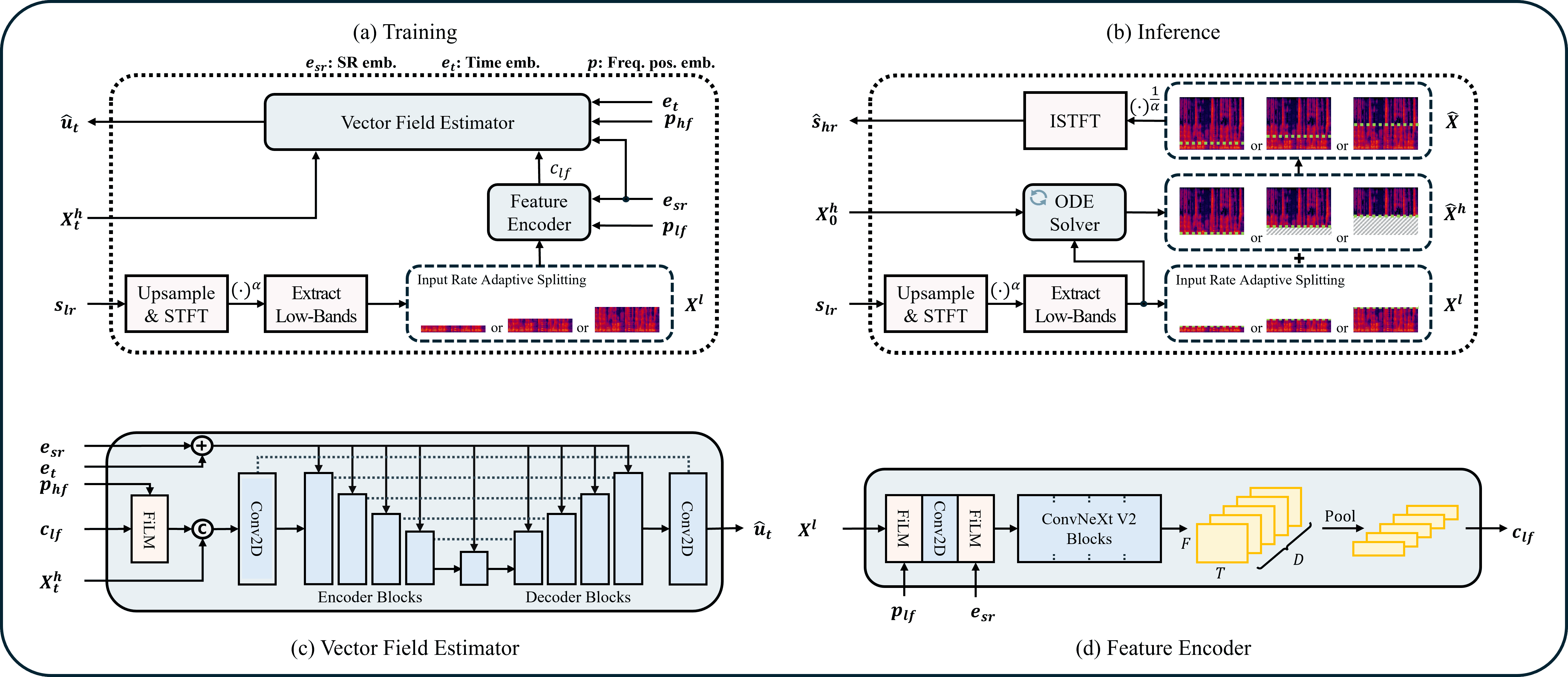
Table of contents
- Features
- Installation
- Models
- Nodes
- Choosing
input_sr - Performance (speed)
- Recommended settings
- Long audio & chunking
- Example workflow
- How it works
- Troubleshooting
- Credits & license
Features
- 🎚️ 8 / 12 / 16 / 24 kHz → 48 kHz with a single model — speech, music, SFX.
- 🧩 Two-node design — a cached Model Loader + a Super-Resolution sampler.
- ⬇️ Auto-download of the official checkpoints into
models/universr/on first use. - 🔗 Long-audio chunking with click-free overlap-add (handles clips of any length).
- 🎧 Stereo-aware — each channel is processed independently and preserved.
- 🎛️ Wet/dry blend — full SR, or dial it back to gently brighten already-48 kHz audio (BWE).
- 🎲 Seed control with global-RNG isolation (won't perturb other nodes' randomness).
- 📊 Optional before/after spectrogram image output.
- 🎬 Video in / out — extract a video's audio, super-resolve it, and remux it back onto the
original video (no video re-encode), all with
ffmpeg. - 📦 Self-contained — the UniverSR inference code is vendored; the only extra dependency beyond
ComfyUI's stack is
torchdiffeq.
Installation
cd ComfyUI/custom_nodes
git clone https://github.com/ethanfel/ComfyUI-UniverSR.git
pip install -r ComfyUI-UniverSR/requirements.txt
Then restart ComfyUI. The nodes appear under the audio/UniverSR category.
Dependencies. torch, torchaudio, numpy and matplotlib already ship with ComfyUI. This node
only adds:
torchdiffeq einops timm huggingface_hub pyyaml
(einops/timm/huggingface_hub/pyyaml are usually already present; torchdiffeq is the one
that typically needs installing.) The universr package itself is vendored under vendor/ — if a
pip-installed copy is found it is preferred, otherwise the bundled one is used, so no git+ install
is required.
The video nodes additionally need ffmpeg on your PATH (apt install ffmpeg /
brew install ffmpeg / conda install -c conda-forge ffmpeg) and soundfile (in requirements.txt).
The audio SR nodes work without either.
GPU recommended. Inference runs on CUDA if available and falls back to CPU (much slower).
Models
| Preset | Domain | Hugging Face | Notes |
|---|---|---|---|
universr-audio |
General (music / SFX / mixed) | woongzip1/universr-audio |
Recommended default. |
universr-speech |
Speech / voice | woongzip1/universr-speech |
Tuned for voice recordings. |
Each preset is ~230 MB and downloads automatically to ComfyUI/models/universr/<preset>/ the
first time you load it (it lands as config.yaml + pytorch_model.bin).
Manual / offline install — drop the two files into ComfyUI/models/universr/<name>/ yourself:
huggingface-cli download woongzip1/universr-audio \
  --local-dir ComfyUI/models/universr/universr-audio
Any folder you place under models/universr/ that contains config.yaml + pytorch_model.bin will
also show up in the loader's model dropdown.
Nodes
LoadAudio ─────────────┐
                       ▼
UniverSR Model Loader ─► UniverSR Super-Resolution ─► SaveAudio / PreviewAudio
                                          └─ spectrogram ─► PreviewImage
UniverSR Model Loader
Loads (and caches) a checkpoint. Output: UNIVERSR_MODEL.
| Input | Type | Default | Description |
|---|---|---|---|
model |
choice | universr-audio |
Preset to download, or a local checkpoint folder found under models/universr/. |
device |
auto / cuda / cpu |
auto |
Where to load the weights. auto picks CUDA when available. |
tf32 (opt.) |
bool | False |
TF32 matmul + conv on Ampere+ (~1.15×). Tonally neutral in testing but not bit-exact; off = reference fp32. |
compile (opt.) |
bool | False |
torch.compile the network (~2×). See Performance. |
local_path (opt.) |
string | "" |
Override: a folder with config.yaml + pytorch_model.bin, or a raw training checkpoint (.pth / .ckpt). |
config_path (opt.) |
string | "" |
config.yaml to pair with a raw checkpoint. Empty → the bundled default config. |
The loaded model is cached by (path, device), so re-running a graph or reusing the loader across
runs does not reload the weights.
UniverSR Super-Resolution
Runs the super-resolution. Outputs: AUDIO (48 kHz) and IMAGE (spectrogram).
| Input | Type | Default | Range | Description |
|---|---|---|---|---|
audio |
AUDIO | — | — | Input audio (any sample rate / mono or stereo). |
model |
UNIVERSR_MODEL | — | — | From the Model Loader. |
input_sr |
choice | auto |
auto / 8000 / 12000 / 16000 / 24000 | Effective input bandwidth (Hz). Content is valid up to input_sr/2 and regenerated above it. auto detects the cutoff for you (see below). |
ode_method |
choice | midpoint |
euler / midpoint / rk4 | ODE solver. euler fastest → midpoint balanced → rk4 best. |
ode_steps |
int | 4 |
1–64 | Flow-matching integration steps. 4 is fast & validated; 4–10 is a good range. |
guidance_scale |
float | 1.5 |
0–6 | Classifier-free guidance. Higher = denser highs but less faithful. 0 disables CFG. |
seed |
int | 0 |
— | Noise seed for the flow source. 0 = random each run. |
chunk_seconds |
float | 10.0 |
0–120 | Process long audio in chunks this long to bound VRAM. 0 = whole clip at once. |
overlap_seconds |
float | 0.5 |
0–5 | Crossfade overlap between chunks (prevents seam clicks). |
blend |
float | 1.0 |
0–1 | Wet/dry mix. 1.0 = full SR; lower keeps more of the original. |
unload_model |
bool | false |
— | Free the model from VRAM after this run. |
show_spectrogram |
bool | true |
— | Also output a before/after spectrogram comparison image. |
UniverSR Load Video Audio
Upload or pick a video, extract its audio track (native rate/channels, via ffmpeg), and keep a
reference to the source video for remuxing. The clip previews inline in the node — with an upload
button and drag-and-drop, just like a normal video loader. Outputs UNIVERSR_VIDEO and AUDIO.
| Input | Type | Default | Description |
|---|---|---|---|
video |
upload / choice | — | Drop or upload a video, or pick one from ComfyUI's input/ folder. |
start_time (opt.) |
float | 0.0 |
Trim start, seconds. |
duration (opt.) |
float | 0.0 |
Trim length, seconds (0 = to end). |
There is also a UniverSR Load Video Audio (Path) variant that takes an absolute video_path string
(for files outside ComfyUI's input/ folder); it previews after you run it. Both feed the combiner.
UniverSR Video Combiner
Muxes an AUDIO track onto the source video without re-encoding the video (-c:v copy) and saves
the result. If the loader trimmed the clip, the same trim is applied to the video so A/V stay aligned.
| Input | Type | Default | Description |
|---|---|---|---|
video |
UNIVERSR_VIDEO | — | From UniverSR Load Video Audio. |
audio |
AUDIO | — | The enhanced 48 kHz audio. |
filename_prefix |
string | UniverSR |
Output name prefix (auto-incremented). |
audio_codec (opt.) |
choice | aac |
aac / flac / pcm_s16le / libopus / libmp3lame. |
save_output (opt.) |
bool | true |
Save to output/ (else temp/). |
Output: output_path (string) and an inline video preview.
Video workflow
UniverSR Load Video Audio ──┬─ audio ─► UniverSR Super-Resolution ─ audio ─┐
                            │                                              ▼
                            └────────────── video ──────────────► UniverSR Video Combiner ─► .mp4
                                              UniverSR Model Loader ─► (Super-Resolution)
Load the video → super-resolve its audio (set input_sr to the content bandwidth) → feed the enhanced
audio and the video reference into the combiner. Ready-made graph:
example_workflows/universr_video.json.
Choosing input_sr (the one setting that matters most)
input_sr tells the model the effective bandwidth of your content. Everything above
input_sr / 2 is treated as missing and regenerated:
input_sr |
Treated as valid up to | The model regenerates |
|---|---|---|
8000 |
4 kHz | 4 – 24 kHz |
12000 |
6 kHz | 6 – 24 kHz |
16000 |
8 kHz | 8 – 24 kHz |
24000 |
12 kHz | 12 – 24 kHz |
auto (default) analyses the input's spectrum, finds the cutoff cliff, and picks the largest
supported bandwidth at or below it (rounding down, to avoid feeding the model an empty band). It
prints its decision, e.g. auto: cutoff 8.0 kHz (drop 53 dB) -> input_sr=16000. When there's no clear
cutoff (full-band or gently rolled-off audio) it falls back to 24000 (least aggressive). Auto is
most reliable on genuinely band-limited material (codecs, downsamples, telephone); for fine control or
deliberate over-brightening, pick a value manually.
Two ways to use it:
- Genuine low-rate audio (classic super-resolution). You have an 8 kHz (or 16/24 kHz) recording
and want a full 48 kHz result → set
input_srto that rate. 8 kHz → 48 kHz is the strongest case (the model is trained 70 % on it). - Brighten muffled but full-rate audio (bandwidth extension). Your file is already 48 kHz but
sounds dull / rolled-off (e.g. generated audio, old MP3s). Pick the
input_srthat matches where real content ends and let the model rebuild above it —16000(rebuild only above 8 kHz) is the most natural;8000is brighter and more aggressive. Combine withblend < 1.0to keep the dry signal and add just a touch of high end.
The node always reproduces the model's training degradation internally (band-limit → super-resolve), so you don't need to pre-process or resample your audio — just pick the bandwidth.
Performance (speed)
Speedups live on the Model Loader. compile is the real, tonally-neutral win (op fusion); tf32 is
a small extra that is off by default.
| Setting | Speedup (measured) | Notes |
|---|---|---|
compile (opt-in) |
~2.1× | torch.compile the network — op fusion, no tonal change. The recommended speedup. |
tf32 (default off) |
~1.15× | TF32 matmul + conv on Ampere+. Stacks with compile → ~2.5×. Tonally neutral in our spectral A/B but not bit-exact — left off so the default is reference fp32. |
On the reference machine, a 12 s clip went 4.3 s → 1.7 s (2.48×) with both enabled.
About tf32: in a fixed-seed A/B, TF32 left the spectral centroid and >8 kHz energy unchanged to 3
significant figures (i.e. it does not darken the output). If you toggle it and the result sounds
different, check your seed — with seed=0 every run draws new noise, so two runs differ regardless of
TF32. To compare fairly, set a fixed seed and change only the toggle. Enabling tf32 also turns on
cuDNN conv-TF32; disabling it restores true fp32 (PyTorch leaves conv-TF32 on by default otherwise).
About compile: the first run pays a one-time compile (~10–35 s); after that the compiled model is
cached for the whole ComfyUI session. The model can only be compiled for a fixed input shape, so the
node automatically pads every chunk to chunk_seconds — meaning clips of any length reuse the same
compiled graph (no per-length recompiles). Set the sampler's chunk_seconds near your typical clip length
so short clips aren't padded up wastefully. Requires CUDA; falls back to eager if compilation fails.
Things that don't help here: CFG-batching, channel/chunk batching, and
channels_last— the GPU is already compute-bound at batch 1, so they gave ~0 gain in testing. Going faster thancompilerequires bf16/fp16, which is not equal-quality (verify by ear first).
Recommended settings
| Content | input_sr |
guidance_scale |
ode_method / ode_steps |
|---|---|---|---|
| Speech (8 kHz source) | 8000 | 1.0 – 1.5 | midpoint / 4 |
| Music (8 kHz source) | 8000 | 1.5 – 2.0 | midpoint / 4–8 |
| Sound effects | 8000 | ~1.5 | midpoint / 4 |
| Brighten dull 48 kHz audio | 16000 | 2.0 – 3.0 | midpoint / 4 (try blend 0.6–1.0) |
Notes:
- Higher
guidance_scale(>3) produces denser highs but can add hiss/artifacts. - Higher input rates (especially 24 kHz) reconstruct less high-frequency detail than 8 kHz, an upstream model limitation — see the UniverSR notes.
Long audio & chunking
UniverSR runs the whole clip through a flow-matching ODE in one pass, which exhausts VRAM on long files. This node splits the audio in the time domain and stitches the results with overlap-add and a linear crossfade (weight-normalised), so seams are click-free.
chunk_seconds— lower it if you hit out-of-memory errors;0processes the whole clip at once. Values below ~0.68 s are raised to the model's internal minimum automatically.overlap_seconds— raise it slightly if you ever hear a seam between chunks.- Stereo is processed per-channel; a ComfyUI progress bar tracks
batch × channels × chunks.
Example workflow
A ready-made graph is in example_workflows/universr_super_resolution.json
— drag it onto the ComfyUI canvas. It wires LoadAudio → UniverSR Model Loader → UniverSR Super-Resolution → PreviewAudio with the spectrogram going to a PreviewImage.
How it works
ComfyUI audio arrives at an arbitrary real sample rate. UniverSR's file API relies on
torchaudio.load (whose torchcodec backend is fragile across environments), and its tensor API
assumes the tensor is already at input_sr. So this node does the band-limit itself, entirely with
pure-DSP resampling (no codec):
- Resample the input to 48 kHz.
- For each chunk, downsample to
input_sr→ hand UniverSR a genuine low-rate tensor. - UniverSR upsamples back to 48 kHz internally and regenerates the high band via flow matching.
- Overlap-add the enhanced chunks; optionally blend with the dry signal.
This reproduces the exact training-time degradation (validated against the upstream pipeline). The node also snapshots and restores the global torch/CUDA RNG around inference, so seeding here never makes the rest of your ComfyUI graph deterministic.
Troubleshooting
| Symptom | Fix |
|---|---|
Could not import the 'universr' package |
pip install torchdiffeq into your ComfyUI Python env. |
| CUDA out of memory | Lower chunk_seconds (e.g. 5–8), or set the loader device to cpu. |
| Output sounds harsh / hissy | Lower guidance_scale; for BWE, raise input_sr and/or lower blend. |
| Result barely brighter | This is normal for higher input_sr; use a lower input_sr or raise guidance_scale. |
| First run hangs for a while | It's downloading the ~230 MB checkpoint — watch the console. |
| Spectrogram is blank | matplotlib is missing/headless; audio output is unaffected. |
Credits & license
UniverSR © Woongjib Choi, Sangmin Lee, Hyungseob Lim, Hong-Goo Kang — DSPAI Lab, Yonsei
University — released under the MIT License (see LICENSE).
This repository wraps UniverSR for ComfyUI and vendors its inference code unmodified under
vendor/. All credit for the model and method goes to the original authors.
@inproceedings{choi2026universr,
  title     = {{UniverSR}: Unified and Versatile Audio Super-Resolution via Vocoder-Free Flow Matching},
  author    = {Choi, Woongjib and Lee, Sangmin and Lim, Hyungseob and Kang, Hong-Goo},
  booktitle = {IEEE International Conference on Acoustics, Speech, and Signal Processing (ICASSP)},
  year      = {2026}
}
Links: paper · demo · upstream repo